Inspect / Rainmeter skin
SASMusicPlayer Rainmeter Skin
SASMusicPlayer provides left-, center- and right-aligned music-player layouts alongside separate cover art.
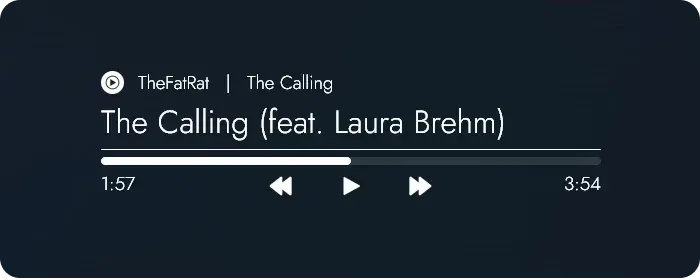
SASMusicPlayer provides left-, center- and right-aligned music-player layouts alongside separate cover art. Both the player and artwork have NowPlaying and WebNowPlaying variants, while a settings interface and grouped variables allow adjustments to individual elements such as text, controls, progress bars and colors.
What this skin includes
- Middle-clicking the player or cover art opens the customization interface.
- Settings are also accessible through the context menu.
- Version 1.3 added color and gradient interface controls.
- Version 1.3.2 added text shadow and glow adjustments.
- Version 1.3.2 includes WNP-Redux plugin v2.0.5.
Setup and limits
Use the source's skin download or release page and provide Rainmeter and the listed WebNowPlaying-Redux browser extension. For optional desktop Spotify support, follow the linked Spicetify instructions and its Advanced Usage > Extensions > Web Now Playing section. Open customization by middle-click or the context menu.
The documented layout is adjusted for 1920×1080 screens, and high-DPI users may need to readjust settings. WebNowPlaying-Redux is listed as a requirement; desktop Spotify support additionally uses optional Spicetify configuration. Customization has stated limits. Current Windows-build compatibility has not been independently verified; this research did not install or execute the skin.
Open creator source and setup instructions (source page, not a direct installer).
Creator and preview provenance
Created by DerianMelvin. Creator source · Original source preview. Creator/source documentation preview from DerianMelvin/SASMusicPlayer. Background artwork or third-party content in the image is not asserted to be included. Preview reproduction is owner-authorized with unverified reuse rights; this is not a creator license grant.
Related skins and installation
Read the Rainmeter installation guide. Compare Monstercat Visualizer and Mond. These are different works, not additional editions of this skin.
Similar skins
Alternatives in the same functional category, excluding this entry. Compare their source notes before choosing.

Skin
Pop-up Text Rainmeter Skin
Pop-up Text is a Rainmeter skin that presents text through an animated popup.
Skin
Now Playing Circle for MOND Rainmeter Skin
Now Playing Circle modifies MOND's music player with circular album artwork and WebNowPlaying media data.

Skin
Simple Spotify Control for Rainmeter
Simple Spotify Control for Rainmeter is a Spotify-oriented media controller based on an earlier skin called Spotify Control.