Inspect / Rainmeter skin
Rainmeter-TomatoTelemetry Rainmeter Skin
Rainmeter-TomatoTelemetry places a blood glucose reading from the Tomato monitoring app on the desktop.
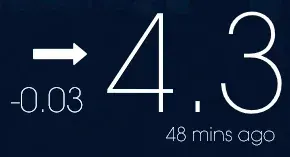
Rainmeter-TomatoTelemetry places a blood glucose reading from the Tomato monitoring app on the desktop. Configuration uses a follower link entered into a separate settings skin. Its documented appearance option is a choice between black and white text, applied after refreshing the displayed meter.
What this skin includes
- Displays glucose levels associated with the Tomato monitoring app.
- Uses a follower URL beginning with https://global.fanqies.com/remote/glycemic/.
- The source describes the displayed value as mmol/L and ties the unit to app settings.
- Its settings skin offers black or white text.
- Settings changes take effect after refreshing the meter skin.
Setup and limits
Follow Tomato's official instructions to obtain a follower link. Install the release .rmskin package, or extract the downloaded files into your Rainmeter skins folder. Open the settings skin, paste the follower URL into the top bar, and optionally change text color. Refresh the meter skin; the settings window can then be unloaded.
The documented setup depends on the Tomato app's follower-link mechanism and a URL with the specified prefix. The source describes mmol/L readings while noting that the displayed unit depends on app settings; it does not document additional unit controls within the skin. Current Windows-build compatibility has not been independently verified; this research did not install or execute the skin.
Open creator source and setup instructions (source page, not a direct installer).
Creator and preview provenance
Created by xun468. Creator source · Original source preview. Creator/source documentation preview from xun468/Rainmeter-TomatoTelemetry. Background artwork or third-party content in the image is not asserted to be included. Preview reproduction is owner-authorized with unverified reuse rights; this is not a creator license grant.
Source license or licensing statement; check the scope and any more specific notices before reuse.
Related skins and installation
Read the Rainmeter installation guide. Compare Mond and Wisp. These are different works, not additional editions of this skin.
Similar skins
Alternatives in the same functional category, excluding this entry. Compare their source notes before choosing.
Skin
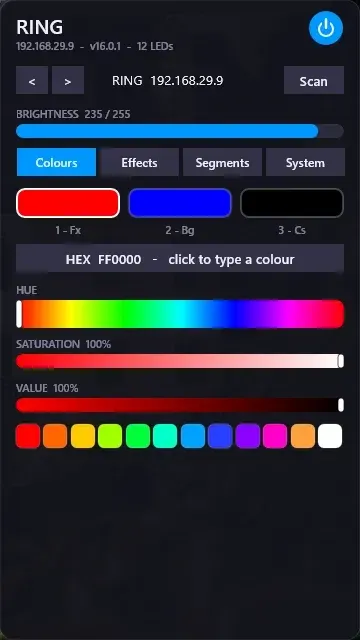
WLED Control for Rainmeter
WLED Control puts lighting controls into a tabbed Rainmeter interface rather than a conventional desktop information widget.

Skin
Cryptocoins Widget for Rainmeter
Cryptocoins Widget is a Rainmeter cryptocurrency display fork with compact widget variations.


Skin
Minimal To-Do List Rainmeter Skin
Minimal To-Do List presents tasks in a dark Rainmeter widget with rounded corners and vector graphics.