Inspect / Rainmeter skin
Cryptometer Rainmeter Skin
Cryptometer adds a cryptocurrency list to the Win10Widgets environment, borrowing that suite's styling rather than introducing a separate desktop theme.
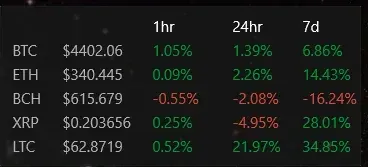
Cryptometer adds a cryptocurrency list to the Win10Widgets environment, borrowing that suite's styling rather than introducing a separate desktop theme. Its default configuration follows five currencies, refreshes their data at fifteen-minute intervals, and provides clickable symbols that lead to additional charts and information.
What this skin includes
- Tracks five cryptocurrencies in its default configuration.
- Refreshes data every 15 minutes.
- Currency symbols link to charts and further information.
- Additional currencies require configuration edits and row positioning.
- Lists Rainmeter 4.1+ and Win10Widgets as requirements.
Setup and limits
Install Rainmeter and Win10Widgets, then create a Cryptometer folder inside the Win10 Widgets skins directory. Extract the repository contents into it. The supplied instructions place an API key in Cryptometer-Medium.ini, then use Rainmeter's Refresh All command. Currency changes require editing individual sections and their row numbers.
The historical setup directs users to a GetMarketCap.com Pro account for an API token, described there as free; current account terms and API availability are not established. It also references CoinMarketCap API information. More than five currencies requires increasing BackgroundHeight, and duplicate row numbers cause overlap. Current Windows-build compatibility has not been independently verified; this research did not install or execute the skin.
Open creator source and setup instructions (source page, not a direct installer).
Creator and preview provenance
Created by bkuhl. Creator source · Original source preview. Documentation preview published in bkuhl/cryptometer; credited to bkuhl. Third-party wallpaper or imagery is not asserted included. Preview reproduction is owner-authorized with unverified reuse rights; this is not a creator license grant.
Related skins and installation
Read the Rainmeter installation guide. Compare Mond and Wisp. These are different works, not additional editions of this skin.
Similar skins
Alternatives in the same functional category, excluding this entry. Compare their source notes before choosing.
Skin
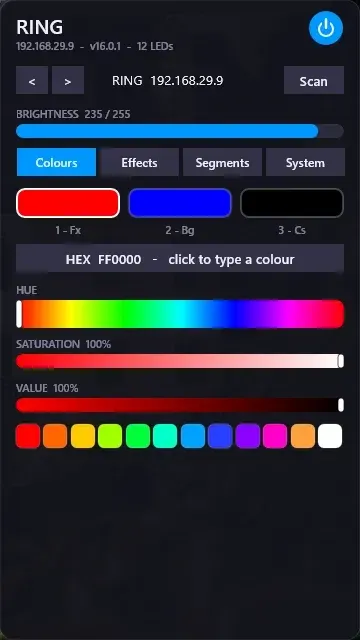
WLED Control for Rainmeter
WLED Control puts lighting controls into a tabbed Rainmeter interface rather than a conventional desktop information widget.

Skin
Cryptocoins Widget for Rainmeter
Cryptocoins Widget is a Rainmeter cryptocurrency display fork with compact widget variations.


Skin
Minimal To-Do List Rainmeter Skin
Minimal To-Do List presents tasks in a dark Rainmeter widget with rounded corners and vector graphics.