Inspect / Windows cursor set
Future Windows Cursors: Amber, Cyan and Dark
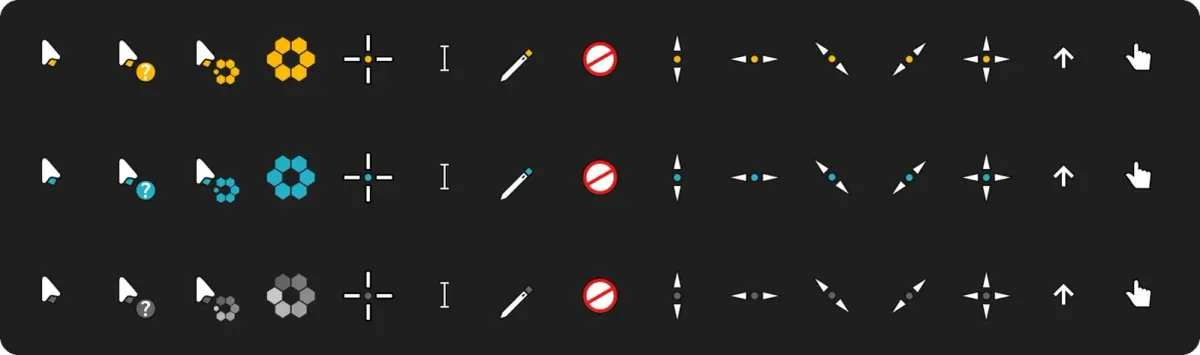
Future's Windows port groups Amber, Cyan and Dark accent variants around the same white pointers with dark outlines.
Download future-amber-w11-hidpi-v0.2.0.zip
- Creator / project credit
- yeyushengfan258 (Future artwork), based on Keefer Rourke's Capitaine; hervad (Windows packaging)
- Package format
- ZIP archive; not a Rainmeter package
- Source release
- v0.2.0 (source label, not a DeskSpruce test version)
Appearance and choice
Future's Windows port groups Amber, Cyan and Dark accent variants around the same white pointers with dark outlines. The source says only the accent differs, so those three choices stay on this one work page. The primary download is Amber, with the alternative Windows assets linked below.
Busy and working cursors are documented as animated, with a ring of hexagons that builds and fades. The maintainer notes an intentionally empty final frame and Windows timing differences from the original. That specific behavior is more useful to compare than assuming a still preview proves smooth animation.
Before changing your pointers
Source scaling tables distinguish measured rows at lower scales from assumed higher-scale behavior and acknowledge softness at 125% and 175%. No source benchmark or loader test is represented as a DeskSpruce result. Location/person roles reuse a pointing hand according to the source; intended Windows 11 support is not independently tested here.
Extract the archive to a folder you can keep. If it supplies .cur or .ani pointer files, use the Windows Pointers dialog to browse for the file for each role, and save a named scheme. A ZIP is a container, .cur is a cursor file and .ani is an animated cursor file; an .inf is configuration, not a preview. Do not run unfamiliar installers merely to inspect the set. See the manual Windows cursor guide for the documented selection and restore path.
Source and credit
The official project README supplies the descriptions and existing preview. yeyushengfan258 (Future artwork), based on Keefer Rourke's Capitaine; hervad (Windows packaging). A checked download destination is not a malware assessment, an installation result or proof of third-party artwork rights.
Compare cursor sets
Official style variants
All links below are release assets for the same pointer family. Names identify the palette, outline, body or handedness options documented by the source; choose one rather than installing every variant.
Similar cursor sets
Alternatives in the same functional category, excluding this entry. Compare their source notes before choosing.

Cursor set
Polar Windows Cursor Set
Polar is a white pointer family whose Orange, Blue and Green variants differ in the spinning bar of the busy and working cursors.

Cursor set
Comix Cursors for Windows: Styles and HiDPI Notes
Comix uses a deliberately bold pointer style with six colors and choices of regular or slim outline, translucent or opaque body, and right- or left-handed schemes.

Cursor set
Windows Modern Cursors: Improved Aero
Windows Modern Cursors is an Aero-derived pointer project described by its maintainer as improved for DPI and dark mode.