Inspect / Rainmeter skin
Don’t Break the Chain Rainmeter Skin
A single elapsed-day counter with a chosen start date, SET mode and a confirmed reset; not a multi-habit completion database.
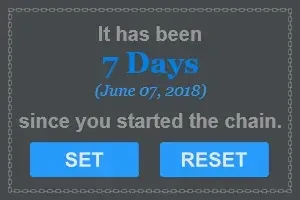
Don’t Break the Chain displays elapsed days since a chosen starting date. The creator preview shows one large day count, the starting date and SET/RESET controls. It is useful as a visible reminder, but the counter does not establish that an activity actually happened each day.
View Don’t Break the Chain releases
A start-date counter, not an activity log
The documented default is midnight of the current day when first launched. The display then reports days in that chain and keeps the original starting date visible. This is different from a calendar that stores individual completion marks or from a service that verifies a streak across devices. No such completion history or cloud sync is documented here.
Set a date deliberately
The source README describes entering a date-selection mode, using arrows to choose a starting date and confirming or cancelling. Times are normalized to midnight for day tracking. Dates in the future cannot be applied according to that documentation, so this is not an event countdown.
The README calls the entry control “start” in one passage while the actual creator preview labels it SET. Follow the state and confirmation shown by your downloaded version rather than treating the wording difference as an extra undocumented feature.
Reset has its own confirmation
The documented RESET workflow asks for confirmation, then sets the start to midnight of the current day. Use it when intentionally starting over. Before replacing or updating a skin folder, back up your configuration and files; DeskSpruce has not verified how every release persists its chosen date or handles timezone and daylight-saving changes.
Get the creator release
The source README directs users to the repository’s releases and a RMSKIN installation. This link opens that release list; it is not a specific binary or a claim that a historical package works on your current Windows build. Choose an available asset only after checking its name and release notes, then follow the Rainmeter skin installation guide.
Use Rainmeter About and log checks if the counter fails to load. Unload it in Manage to remove the reminder. No DeskSpruce installation, health outcome or productivity improvement has been measured.
Choose the reminder you need
Clock with Date shows current time and date rather than an elapsed-day reminder. Calendar selection notes distinguish date context from stored tasks. For a date-first resource, RCalendar provides month context rather than one elapsed count. Keep those jobs separate: a large rising number is not a substitute for recording what was completed.
Source, preview and license
Creator: kazeraniman. This is an authentic source preview, not an independently tested installation. The displayed image is resized and re-encoded as WebP. No generated resource screenshot was used.
Creator source and documentation · Exact original preview · Project license
Full source-preview license notice
MIT License

Copyright (c) 2018 Iman Kazerani

Permission is hereby granted, free of charge, to any person obtaining a copy
of this software and associated documentation files (the "Software"), to deal
in the Software without restriction, including without limitation the rights
to use, copy, modify, merge, publish, distribute, sublicense, and/or sell
copies of the Software, and to permit persons to whom the Software is
furnished to do so, subject to the following conditions:

The above copyright notice and this permission notice shall be included in all
copies or substantial portions of the Software.

THE SOFTWARE IS PROVIDED "AS IS", WITHOUT WARRANTY OF ANY KIND, EXPRESS OR
IMPLIED, INCLUDING BUT NOT LIMITED TO THE WARRANTIES OF MERCHANTABILITY,
FITNESS FOR A PARTICULAR PURPOSE AND NONINFRINGEMENT. IN NO EVENT SHALL THE
AUTHORS OR COPYRIGHT HOLDERS BE LIABLE FOR ANY CLAIM, DAMAGES OR OTHER
LIABILITY, WHETHER IN AN ACTION OF CONTRACT, TORT OR OTHERWISE, ARISING FROM,
OUT OF OR IN CONNECTION WITH THE SOFTWARE OR THE USE OR OTHER DEALINGS IN THE
SOFTWARE.
Similar skins
Alternatives in the same functional category, excluding this entry. Compare their source notes before choosing.
Skin
WLED Control for Rainmeter
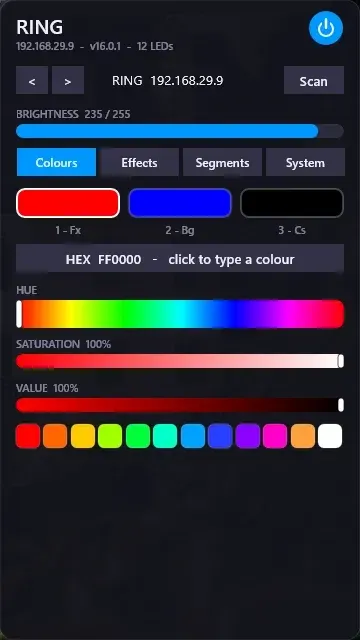
WLED Control puts lighting controls into a tabbed Rainmeter interface rather than a conventional desktop information widget.
Skin
Cryptocoins Widget for Rainmeter
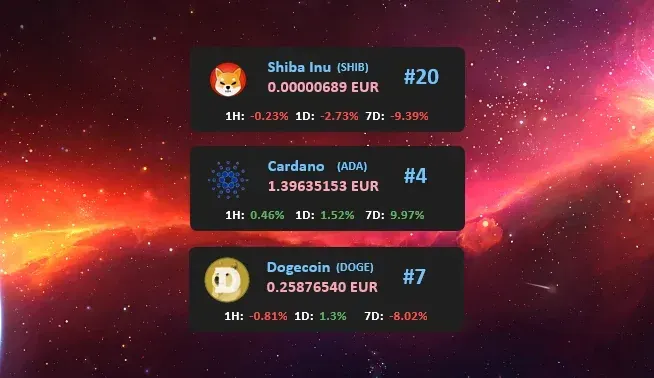
Cryptocoins Widget is a Rainmeter cryptocurrency display fork with compact widget variations.


Skin
Minimal To-Do List Rainmeter Skin
Minimal To-Do List presents tasks in a dark Rainmeter widget with rounded corners and vector graphics.